
Login to Pupsai
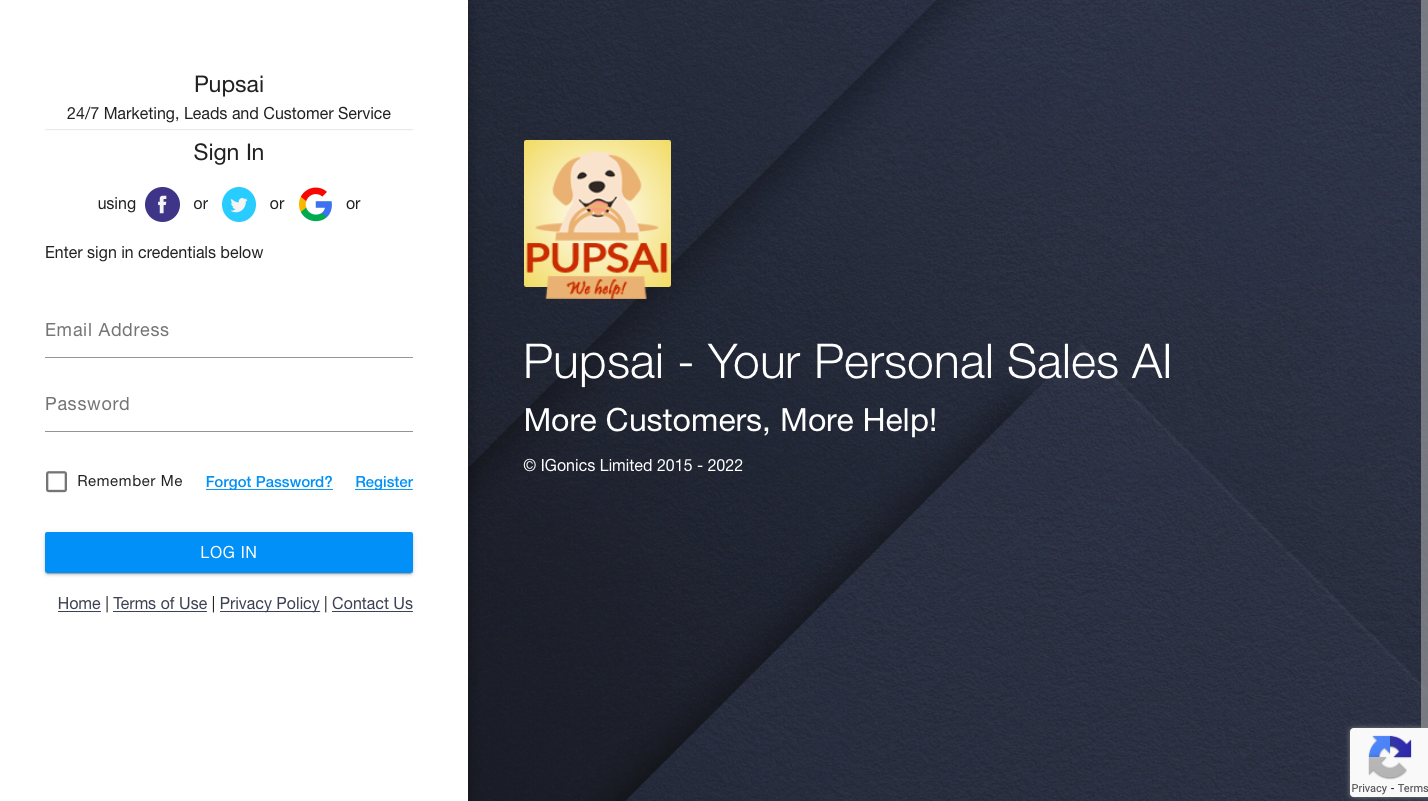
Let’s get you ready for MORE customers and MORE help with Pupsai. There are four (4) ways to login to your Pupsai account after you have registered:
- With Facebook
- With Twitter
- With Google
- With your Email Address
Please refer to Creating an Account on Pupsai to register, if you haven’t already done so.
To get started, navigate to https://pupsai.com/login shown in the picture below
Login with Facebook
- Click the Facebook icon
- If you are not logged into your Facebook account, you’ll be redirected to Login.
- After logging in, you’ll be redirected to your Pupsai dashboard.
Login with Twitter
- Click the Twitter icon
- If you are not logged into your Twitter account, you’ll be redirected to Login.
- After logging in, you’ll be redirected to your Pupsai dashboard.
Login with Google
- Click the Google icon
- If you are not logged into your Google account, you’ll be redirected to Login.
- After logging in, you’ll be redirected to your Pupsai dashboard.
Login with Email Account
- Enter the email address you used to register
- Enter the password you used to register
- Click the Login button
- After a successful login, you’ll be redirected to your Pupsai dashboard.
If you have forgotten your password and to reset it, refer to Resetting your password on Pupsai